

Shopify store design and development
Custom Shopify store design.
Your brand, not a template.
We design and build fully custom Shopify stores. Every page, the cart and the slide-out cart panel are designed from scratch around your brand, not a theme with your logo dropped in. Your bundles, minimums and deals run on Shopify's own discounts, so the store does the math for your customers before they reach checkout.
- Most stores: 20 to 40+ hours
- Deals on Shopify’s own discounts
- No monthly contract
- See pricing options→
I read every request myself and reply within one business day.
Case study · KandyMan
What does a custom Shopify store look like?
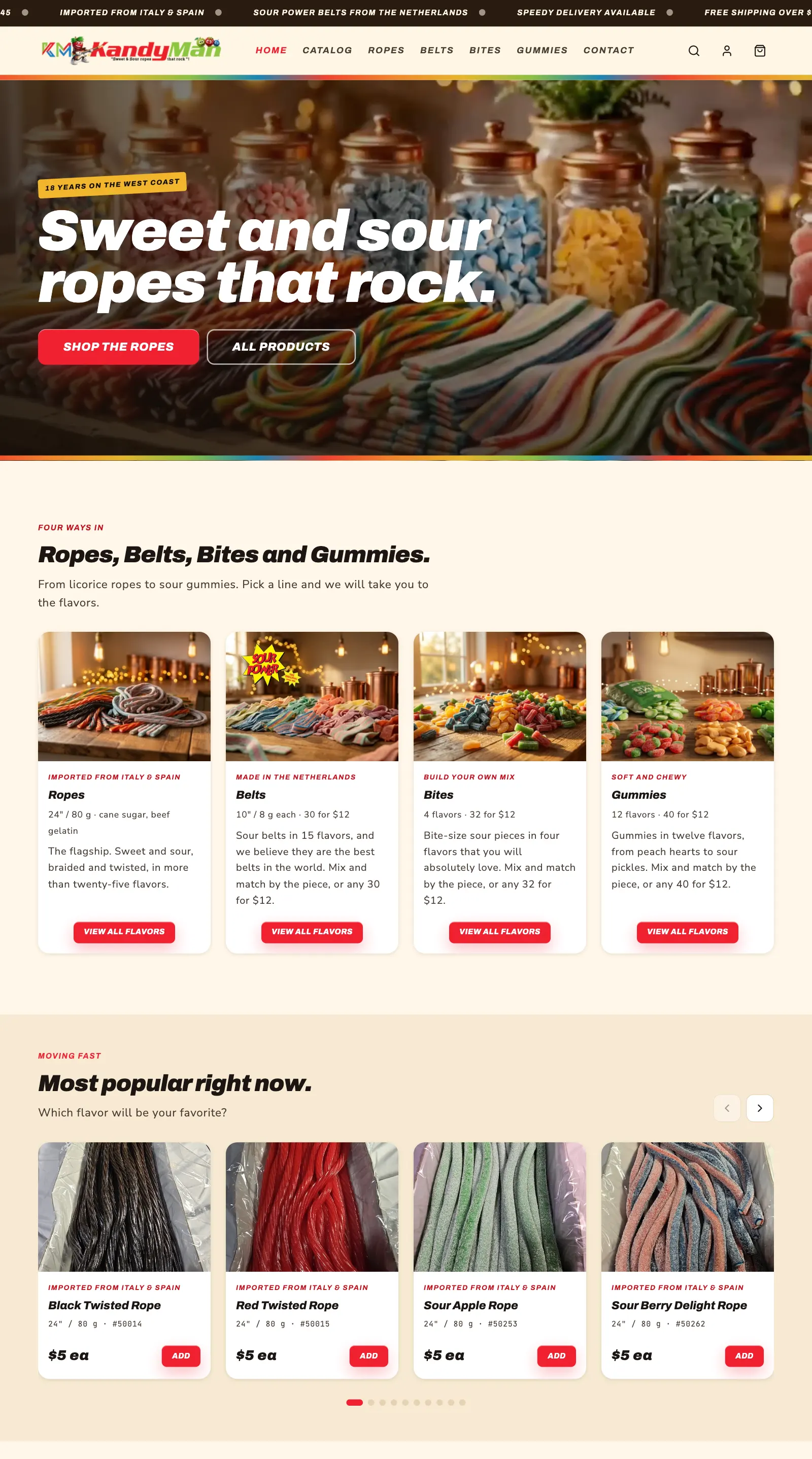
Whatever you picture, on every page. The design is fully custom: the homepage, collections, product pages, the cart and the slide-out cart panel can look and work however you want. KandyMan sells imported licorice ropes, Sour Power belts, bites and gummies, and we designed and built their store from scratch: every page, the cart, the deals, and all the product imagery and video.
- A fully custom design, built section by section
- Mix-and-match deals on four product lines, with no app
- A custom cart panel and cart page that explain every price
- 01
Header and moving deals bar
The brand header, with free shipping and the deals rolling across the top of every page.
- 02
Video hero
A looping video background, made from their own product photos, with the headline and buttons on top.
- 03
Four ways in
Ropes, belts, bites and gummies, each with its own picture, price line and button.
- 04
Moving fast carousel
The most popular flavors in a swipe row with arrows, and Add to bag right on the card.
- 05
Collection pages
A banner for each category, Sweet and Sour filters, sorting, and cards that lead with the deal.
- 06
Search that finds things
Search by flavor, item number or part of a word, narrowed by category.
- 07
Phone menu
A slide-out menu that matches the brand, with free shipping and the fruit characters at the bottom.
- 08
Open and closed switch
A pre-launch notice and a checkout pause, turned on or off with one tick in the theme settings.
Every section has its own settings in Shopify's theme editor, so KandyMan changes the words, pictures and deal messages without us.
Bundles and volume deals
Can Shopify do mix-and-match pricing without an app?
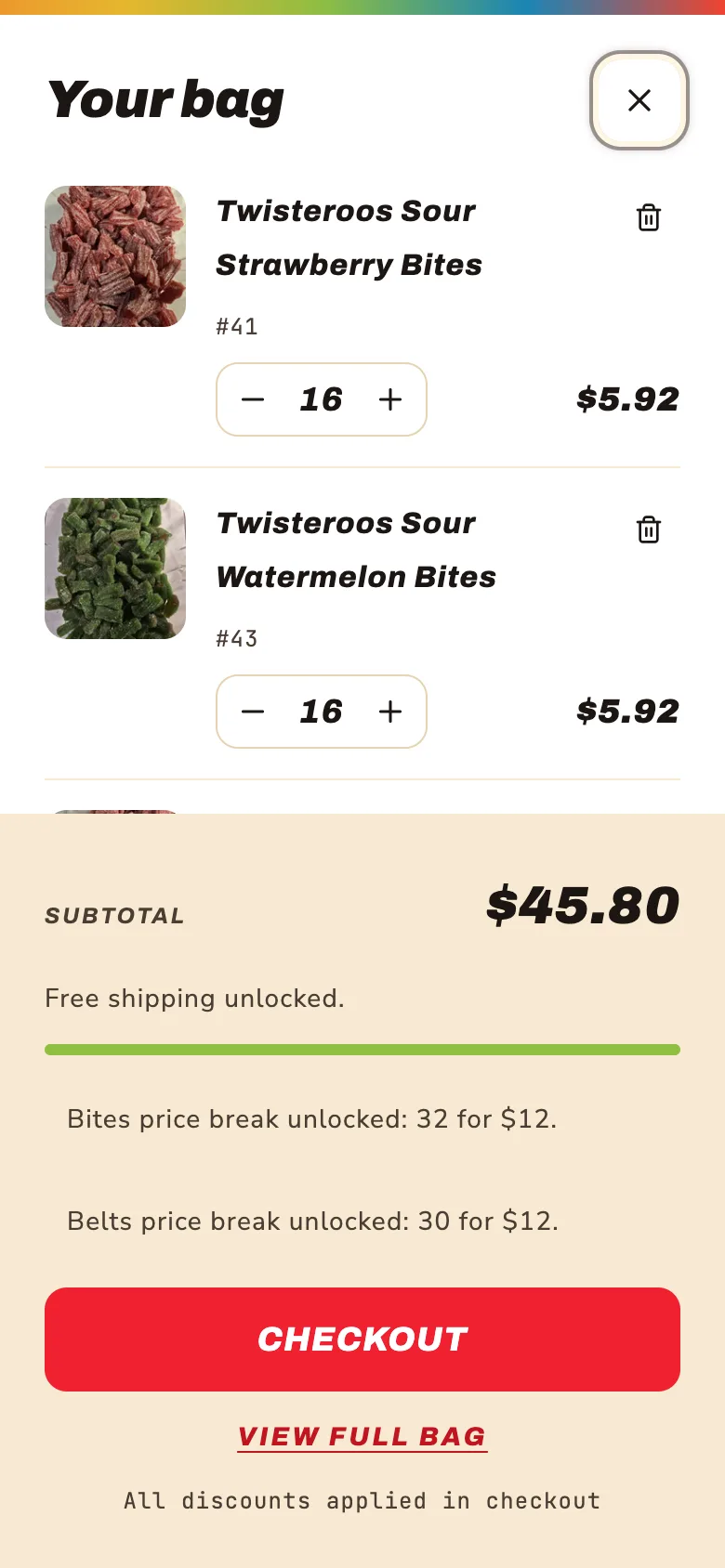
Yes. KandyMan runs it on Shopify's own discounts. Most advice says mix-and-match deals need an app with a monthly fee. KandyMan has five deals across four product lines, all stacking with free shipping, on the Basic plan. Try it: this bag uses their real prices and rules.
Your bag
Example · KandyMan's real pricing

Ropes24 inch licorice ropes

BeltsSour Power belts

BitesSour bites

GummiesGummies and drops
KandyMan's deals
- Ropes
- $5 eachMix any 3 for $12, or any 6 for $22
- Belts
- $0.50 eachMix any 30 for $12, 20 minimum
- Bites
- $0.50 eachMix any 32 for $12, 20 minimum
- Gummies
- $0.40 eachMix any 40 for $12, 25 minimum
- Shipping
- Free over $45Measured after the deals, the way Shopify does
Down to the cent. Shopify takes discounts off each piece and rounds to the cent, so "6 for $22" can't land on exactly $22. We set it to $21.96, so customers always pay a little under the advertised price, never over. Every deal was checked with Shopify's own calculator before it went live.
If your rules go beyond what Shopify can do on its own, we'll say so, and set up the app that fits.
Custom cart
What can you change in a Shopify cart?
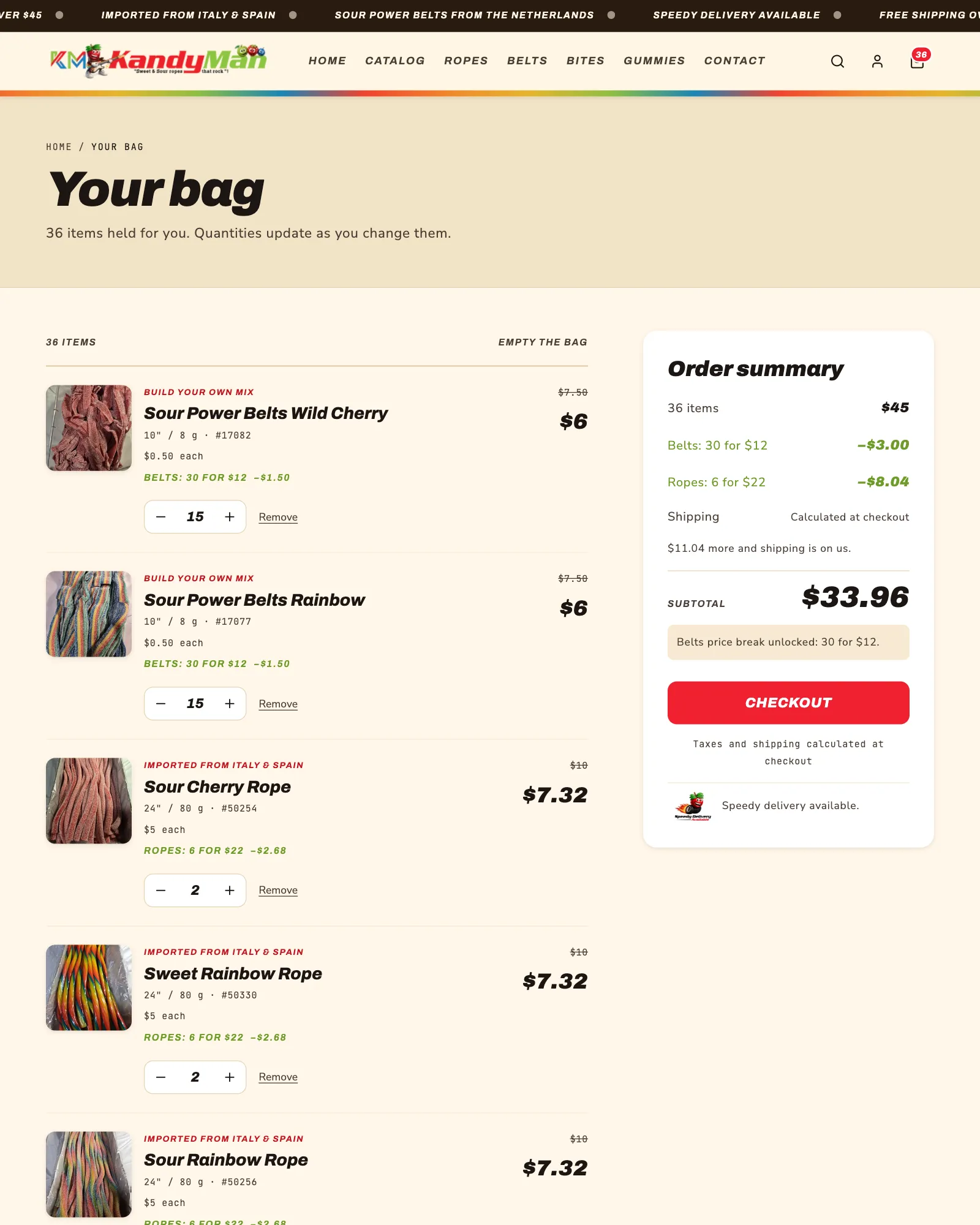
Everything before checkout, including the whole design. The cart page and the slide-out cart panel are designed from scratch like the rest of the store: the layout, the look, the messages and what they show. KandyMan's Shopify store explains every price, every deal as it happens.
- 01
Deals named on every line
Each line shows the deal it got, with the old price struck through.
- 02
Totals that re-band
Go from 6 ropes to 5 and the price moves from 6 for $22 back to 3 for $12, right away.
- 03
A free-shipping bar that adds up
"$13 more and shipping is on us", measured after the deals, the same number Shopify uses at checkout.
- 04
Minimums that hold checkout
Loose pieces have a $10 minimum per category. Checkout waits, with a note saying how many to add.
- 05
Smart suggestions
A "you might also like" row that never suggests what is already in the bag.
- 06
A cart panel and a full cart page
A slide-out bag on every page, and a full bag page with an order summary.

What about checkout?
Checkout is the one page Shopify keeps standard: it gets your colors and logo, and changing how it works needs Shopify Plus, from about $2,300 a month. Everything before it, from the homepage to the cart panel, is yours to design.
Product pages
What makes a product page sell?
The price, the deal and the button, right away. We designed KandyMan's product pages from scratch, phones first, and every page counts what's already in the bag, across every flavor.
- 54products with a photo and an ingredient label view, tap to zoom
- 4product lines, each with its own deal counted live in the bag
- Price, deal and Add to bag near the top of the screen on phones
- A running count: "You have 24 in your bag. Add 5 more to get 30 for $12."
- A green "best pricing level" line once the deal is reached
- Photo and ingredients label views, with tap to zoom, on all 54 labeled products
- Every flavor in one photo row that drifts slowly, with a Pause button
- A sticky Add to bag bar on phones
Imagery and video
Made from their own product photos.
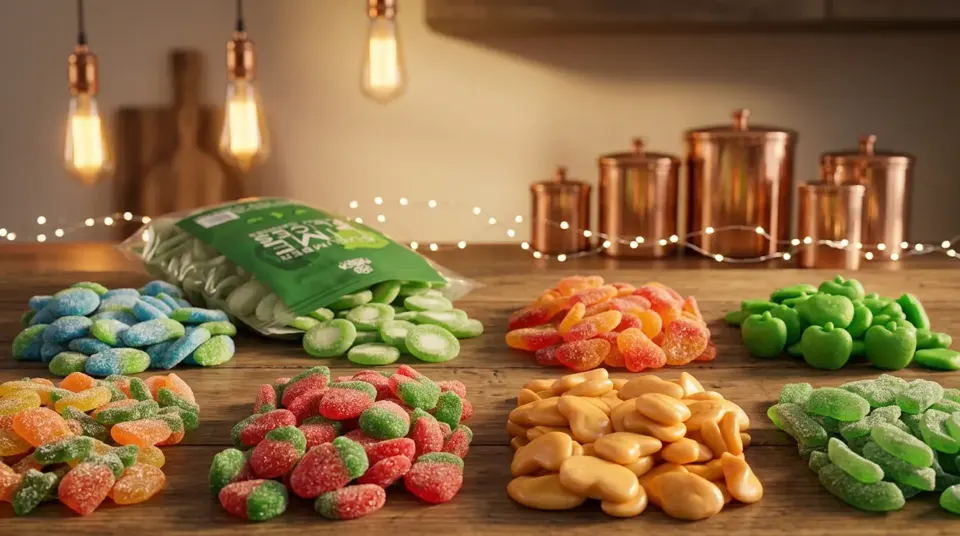
We created KandyMan's header images, banners and the looping hero video with AI, from their own product photos. We help with product photography too, and we also refreshed their logo: see the KandyMan refresh and Video & Motion.


What you send
What do you need from me?
The photos and product details you already have. We do the rest. Send what you can ahead of time, and we build the store around it. It doesn't take much: KandyMan started with one photo and one ingredient label per product and a spreadsheet of their items, and everything on this page was built from that, including a refresh of their logo.
Your product and company photos
Every product photo you have, plus any photos of your business, team or products in use that you want in the store.
Your product descriptions and details
Whatever you can share ahead of time: names, item numbers, prices, sizes, ingredients, or a spreadsheet if you keep one.
Missing something? That’s fine
We write descriptions and create imagery from the photos you have, so gaps don’t hold up your store.
We take it
from here
What we do with it
- Every product set up with its item number, price, weight and description
- Your logo refreshed, if it needs it
- Collections, filters and search, so shoppers find things fast
- Your deals, minimums and free shipping, tested to the cent
- Header images, banners and video, made from your photos
- Ingredient labels straightened, cleaned and added, if your products have them
- The store design, the cart and every page around it
KandyMan started with one photo per product · 59 products built
How it works
How does a Shopify project work?
Five steps, start to finish. Your store keeps selling the whole time, because nothing changes until you publish.
- 01
Talk it through
What you sell, how you price it, and how you want the store to feel. A free consultation, then an estimate in hours.
- 02
Map the catalog and deals
Products, collections, bundles and minimums planned out, and the deal math tested against Shopify’s own discounts first.
- 03
Design
Every page, the cart and the slide-out panel designed from scratch around your brand, or we build a design you already have.
- 04
Build in a draft
Your live store stays exactly as it is. You preview every change with a link before anyone else sees it.
- 05
You publish
When you are happy, you publish it, and the deals, minimums and free shipping are checked again on the live store.
Pricing
How much does a custom Shopify store cost?
It's estimated in hours, after a free consultation. Most stores take 20 to 40 hours or more, depending on whether we design the store or build a design you already have. Prepaid hours never expire, and every task shows on your live report as it's done.
Pay as you go
Billed for the hours used, 2‑hour minimum.
10‑hour block
Good for custom sections or a cart on your current theme.
20‑hour block
Most stores take one or two, start to finish.
Changes after launch come from the same hours.
Your Shopify plan, theme and any apps are paid to Shopify, not to us.
Straight talk
What can't anyone promise?
Sales numbers. A better store helps people buy, but no designer can promise how many will. Here is the honest split.
- ×A set number of sales or orders
- ×A custom checkout without Shopify Plus
- ×That Shopify never changes a feature
- ×That every app works with every theme
- Deals that add up exactly at checkout
- Every change built and checked in a draft first
- A store you own, with settings you can edit
- You pay only for the hours used
Questions
Straight answers.
The questions store owners ask most about custom Shopify work.
Updated
How much does a custom Shopify store cost?
It depends on whether we design the store or build a design you already have. Most stores take 20 to 40 hours or more for the design, the build and the setup. Pay as you go at $75 an hour, or save with prepaid hours: a 10‑hour block is $550 and a 20‑hour block is $800, so most stores land between one and two 20‑hour blocks. You get an estimate after a free consultation, and every hour shows on your live report.
What do I need to send you?
All the product and company photos you want in the store, and whatever product descriptions and details you can share ahead of time, such as names, item numbers, prices and sizes. If something is missing, we write the descriptions and create imagery from the photos you have. KandyMan started with one photo and one label per product and a spreadsheet of their items, and we built the rest, including a refresh of their logo.
How custom can my store look?
Fully custom. The homepage, collection and product pages, the menu, the cart page and the slide-out cart panel can all be designed from scratch, any layout, any look, any message, built around your brand and how you sell. The one exception is Shopify’s checkout, which gets your colors and logo on most plans.
Do I need a custom theme, or will a premium theme do?
A premium theme is fine for many stores. Custom work pays off when the way you sell doesn’t fit a template: bundles and mix-and-match deals, minimums, a cart that explains the pricing, or a brand that needs to look like itself. We can also build custom sections on top of the theme you already have.
Can you work on my existing Shopify store?
Yes. We can redesign it, add custom sections, rebuild the cart, or set up your deals, all in a draft copy of your theme, so your store keeps selling while the work is done.
Do I need an app for bundle or volume pricing?
Often not. KandyMan runs mix-and-match deals on four product lines (3 for $12, 6 for $22, 30 for $12, 32 for $12 and 40 for $12), all stacking with free shipping, on Shopify’s own automatic discounts. No app and no monthly fee. If your rules go beyond what Shopify can do, we’ll tell you which app fits and set it up.
Can you customize the Shopify checkout?
The checkout gets your colors and logo. Changing how the checkout itself works needs Shopify Plus, which starts at about $2,300 a month, so for most stores we put the custom work into the store, the cart panel and the cart page, where the deals and totals are explained before checkout.
Which Shopify plan do I need?
Most small stores do well on Shopify’s Basic plan. KandyMan’s custom store, cart and every one of its deals run on Basic. Your Shopify plan, theme and any apps are paid to Shopify, not to us.
Can I edit the store myself?
Yes. Every custom section has its own settings in Shopify’s theme editor, so you can change the words, pictures, links and deal messages yourself. Products, prices and collections stay in your Shopify admin as usual.
Who owns the store?
You do. The store is on your Shopify account, and the custom theme lives in your store. Nothing is locked to us.
Will my store go down while you work on it?
No. Everything is built in a draft copy of your theme. You preview it with a link, and your live store doesn’t change until you publish.
Do you take product photos?
We help with product photography, but we don’t shoot it ourselves. What we do is create images and video from your own product photos with AI, for page headers, banners and product showcases, like the header images and the looping hero video in the KandyMan store.
Can I keep my WordPress site and add a Shopify store?
Yes. KandyMan kept its WordPress site as the home of the brand, and the store runs on its own address, shop.kandy-man.com. Links on the main site, and kandy-man.com/store, take shoppers straight to the shop.
Do you do SEO for Shopify stores?
Yes. The same search engine (SEO) and AI answer engine (AEO) work we do for websites applies to Shopify stores: titles, descriptions, collections, product details and search data. See SEO & AI Search.
What happens after launch?
Changes and new features come from the same hours, pay as you go or from a prepaid block, and every task shows on your live report as it’s done.
Do I need your web hosting for a Shopify store?
No. Shopify hosts the store. If you also have a website, it can stay where it is or move to Dinsmore Hosting.
Get started
Let's build your store.
A new store or one you already have. Two minutes to tell us what you sell and how, one free conversation, and a clear plan in hours.
- 1Tell me about your storeWhat you sell and how you price it
- 2Free consultationThen an estimate in hours
- 3Built in a draftYou preview it, then you publish
I read every request myself and reply within one business day.