

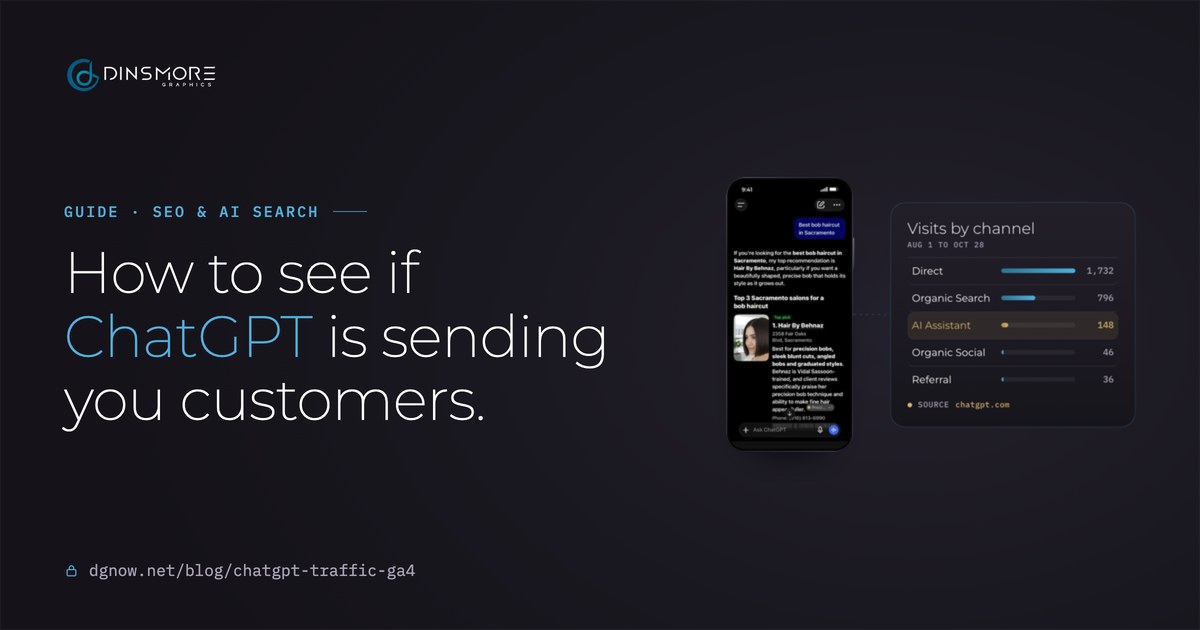
- Direct1,732
- Organic Search796
- AI Assistant148
- Organic Social46
- Referral36
Source chatgpt.com
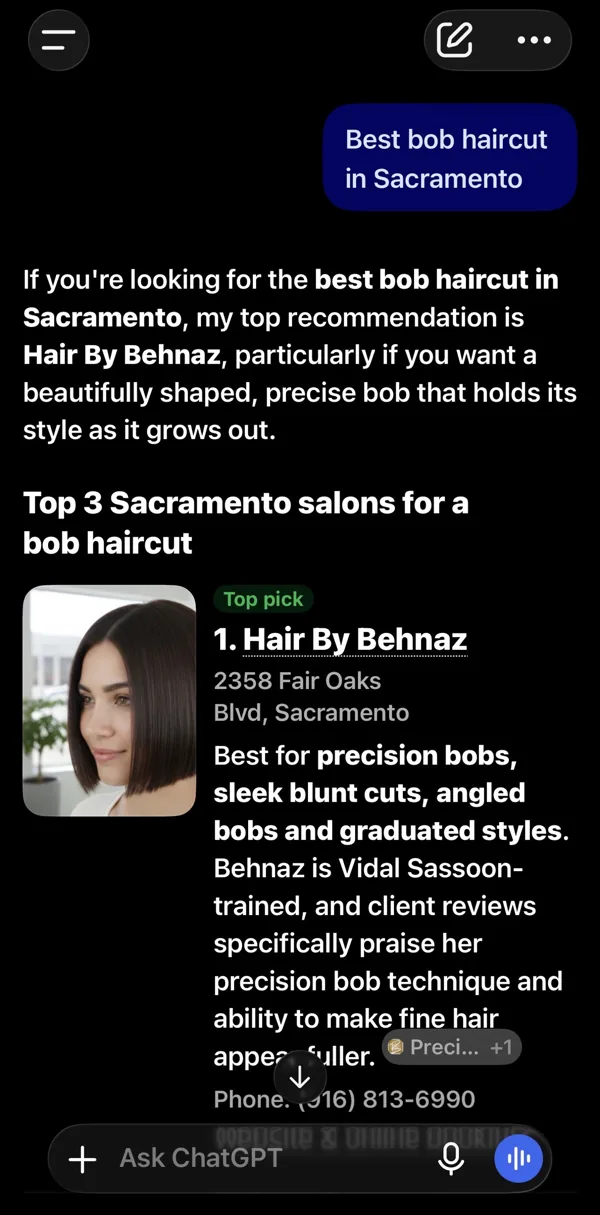
ChatGPT's answerHair By Behnaz in Google Analytics
Key takeaways
- Google Analytics has a built-in AI Assistant channel for visits from ChatGPT, Gemini, Copilot and others. No setup needed.
- Find it in Reports, then Acquisition, then Traffic acquisition. Use a 90-day range: AI visits come in ones and twos.
- The Landing page report filtered to AI Assistant shows which pages AI sends people to.
- Mark your form sends and bookings as key events, or you only see visits, not customers.
- The number is a floor: app clicks, declined cookies and people who Google you after asking AI are counted elsewhere or not at all.
Chapter 01The AI channel
Can Google Analytics show ChatGPT visits?
Yes. Google Analytics 4 has a built-in AI Assistant channel, and it sorts visits from ChatGPT and other AI tools there on its own.
Until this year, a click from ChatGPT landed in Referral next to every other website that links to you, and you had to dig it out by hand. Since May 2026, Google Analytics gives AI tools their own row in the same report as Google search, social media and direct visits. If your site already has Google Analytics, it is already counting them.
Counted as AI Assistant
ChatGPT, Gemini, Copilot, Deepseek and Grok are the examples Google names. A visit counts when the link carries the AI tool's address with it.
Not counted there
Google's own AI Overviews and AI Mode. Clicks from those still count as Organic Search, next to regular Google results.
Chapter 02Find it
Where do I find ChatGPT visits in Google Analytics?
Reports, then Acquisition, then Traffic acquisition. The AI Assistant row is there when AI has sent you visits.
- 1Open Google Analytics
Go to analytics.google.com and pick your website's property.
- 2Open the report
In Reports, open Acquisition, then Traffic acquisition. Some accounts file it under Business objectives instead; the search bar at the top finds it either way.
- 3Widen the dates
Set the date range at the top right to the last 90 days. AI visits come in ones and twos, and a short range hides them.
- 4Find the row
The table lists visits by channel: Direct, Organic Search, and AI Assistant when there are any.
- 5See which AI tool
Change the first column to Session source to see the sites themselves, like chatgpt.com or gemini.google.com.
| Session primary channel group | Sessions | Share |
|---|---|---|
| Direct | 1,732 | 62.7% |
| Organic Search | 796 | 28.8% |
| AI Assistant | 148 | 5.4% |
| Organic Social | 46 | 1.7% |
| Referral | 36 | 1.3% |
Check it once a month and write the number down. One month tells you little; three months in a row show you whether AI is starting to send you customers.
Anthony Dinsmore
Chapter 03Landing pages
Which pages is AI sending people to?
Open the Landing page report and filter it to AI Assistant: it lists the pages AI tools send people to.
- 1Open Landing page
In Reports, open Engagement, then Landing page, or search for "Landing page".
- 2Add the filter
Click Add filter under the report title, choose Session primary channel group, exactly matches, AI Assistant, then Apply.
- 3Read the list
The pages at the top are your front doors from AI. Often it is not the homepage, but a service page or a blog post that answered one question well.
- Dimension
- Session primary channel group
- Match type
- exactly matches
- Value
- AI Assistant
Then open each page on your phone, as a stranger would. Can they see what you do, what it costs and how to book or call within the first screen? AI sent them because the page answered a question; the page has to finish the job.
Chapter 04Leads
Are those AI visits turning into customers?
Only if your bookings and form sends are marked as key events. Then the same report shows leads by channel.
Visits alone don't pay the bills. Google Analytics can count the moments that matter, a booking, a contact form sent, a call button tapped, as key events. Once they are set up, the Key events column in Traffic acquisition shows how many came from each channel, AI Assistant included.
- 1Name the moment
Pick the one or two actions that mean a customer: a booking, a sent form, a thank-you page.
- 2Make it an event
If your site sends visitors to a thank-you page after a form, an event for that page is enough. Booking widgets usually need a small tracking script.
- 3Mark it as a key event
In Admin, then Events, find it and switch on "Mark as key event".
- 4Read it by channel
Back in Traffic acquisition, the Key events column now has a number for every channel.
| Channel | Sessions | Engaged | Key event rate |
|---|---|---|---|
| Direct | 1,732 | 32.9% | 0.23% |
| Organic Search | 796 | 61.8% | 0.75% |
| AI Assistant | 148 | 71.0% | 1.35% |
| Organic Social | 46 | 67.4% | 0% |
| Referral | 36 | 47.2% | 5.56% |
For Hair By Behnaz, 71% of AI visitors engaged with the site, more than visitors from Google search (62%) or direct visits (33%). They arrive having already read a recommendation, and they act like it.
Chapter 05The missing visits
Why is the AI number lower than the truth?
Because only some AI visits arrive labeled. Treat the AI Assistant number as the least AI is sending you, not the total.
Where an AI visit ends up
- Clicks the link in ChatGPT on the webAI AssistantCounted
- Taps the link in a phone appDirectThe app can drop where the visit came from
- Reads the answer, then Googles your nameOrganic SearchLooks like a regular search
- Says no to cookies on your siteNot countedAnalytics waits for a yes
A click from ChatGPT in a browser usually arrives labeled, and Google files it under AI Assistant. A tap in a phone app can lose the label and show up as Direct. Many people read an AI answer and then search your name on Google, which counts as Organic Search. And on a site that asks for cookie consent before Analytics runs, as ours does, a visitor who says no is not counted at all.
ChatGPT also adds a tag to many of its links (utm_source=chatgpt.com), but not to all of them, so the same AI tool can appear in more than one row. The filter in the next chapter catches them wherever they land.
Chapter 06Other AI tools
What about Perplexity, Claude and Google's AI answers?
Most land in AI Assistant, some still in Referral, and Google's own AI answers count as Organic Search.
| AI tool | Where it shows up | Why |
|---|---|---|
| ChatGPT | AI Assistant | Named by Google |
| Gemini, Copilot, Deepseek, Grok | AI Assistant | Named by Google |
| Perplexity, Claude | AI Assistant or Referral | Not on Google's named list: check both |
| Google AI Overviews and AI Mode | Organic Search | Google leaves them out of AI Assistant |
Filter that finds every AI visit
- Traffic acquisition, Add filter
- Session source, matches regex
- Paste this, then Apply
chatgpt|openai|perplexity|claude|gemini|copilot|deepseek|grokWant AI traffic as one row every time? Admin, then Data display, then Channel groups lets you make a copy of Google's list with your own AI channel above Referral, using the same words. It only sorts visits from the day you make it.
Chapter 07Ask and track
How else can I tell if AI sends me customers?
Ask. A "How did you hear about us?" question with ChatGPT as an answer catches what Analytics misses.
- Add it to your form: a How did you hear about us? choice with “ChatGPT or another AI tool” next to Google, a friend and social media.
- Ask on the first call: people remember where they found you, and they enjoy telling you an AI picked you.
- Watch searches for your name: in Search Console, Performance, a rise in searches for your business name often follows AI recommendations.
- Write it down monthly: the same six numbers every month, on the sheet below.
Monthly AI visits check
Ten minutes on the first of the month.- AI Assistant visits
- From Traffic acquisition, last month
- AI tools seen
- chatgpt.com, gemini.google.com...
- Top AI landing pages
- Landing page, filtered to AI Assistant
- Key events from AI
- Bookings, forms, calls
- "ChatGPT" answers on your form
- How did you hear about us?
- Searches for your name
- Search Console, Performance, Queries
Free consultation
Want to know what AI says about you?
Tell me your business and city. I'll check what ChatGPT and Google's AI say about you today, look at your Analytics with you, and tell you what would change it, before any work starts.
Chapter 08What next
What should I do once I know?
If AI sends visits, get the pages it sends them to ready. If it doesn't yet, start by being worth recommending.
- AI already sends visits
Make the landing pages from chapter 3 answer the question in the first lines, show prices and make booking one tap.
- A few visits, no leads
Set up key events first, then check the pages: visits that don’t act usually landed somewhere that didn’t answer.
- No AI row at all
AI isn’t recommending you yet, or not sending clicks. That is where being recommended starts.
Questions
Straight answers.
More of what people ask about AI visits and Google Analytics.
Updated
Why does ChatGPT traffic show up as Direct?
Because the visit arrived without saying where it came from. Taps in phone apps and copied links often lose that label, and Google Analytics files any unlabeled visit as Direct.
What is utm_source=chatgpt.com?
A tag ChatGPT adds to many of the links it shows. Google Analytics reads it as the visit’s source, so chatgpt.com appears in your reports even when other details are missing.
Does Google Analytics count Google’s AI Mode and AI Overviews?
Yes, but as Organic Search, not AI Assistant. Google leaves its own AI answers out of the AI Assistant channel, so they sit next to regular search clicks.
How much traffic does ChatGPT send a small business?
Usually a small share of visits, but often good ones. For Hair By Behnaz it was 148 visits in three months, 5% of the total, and the most engaged visitors of any channel.
Do I need a paid tool to track AI traffic?
No. Google Analytics is free and the AI Assistant channel is built in. Paid tools test what AI tools say about you, which is a different question.
Will the AI Assistant row show my older visits?
The channel arrived in May 2026, so older AI visits sit in Referral. A custom channel group you make yourself only sorts visits from the day you create it.