


Key takeaways
- Ask for vector masters (SVG and PDF). They stay sharp at any size and every other file can be made from them.
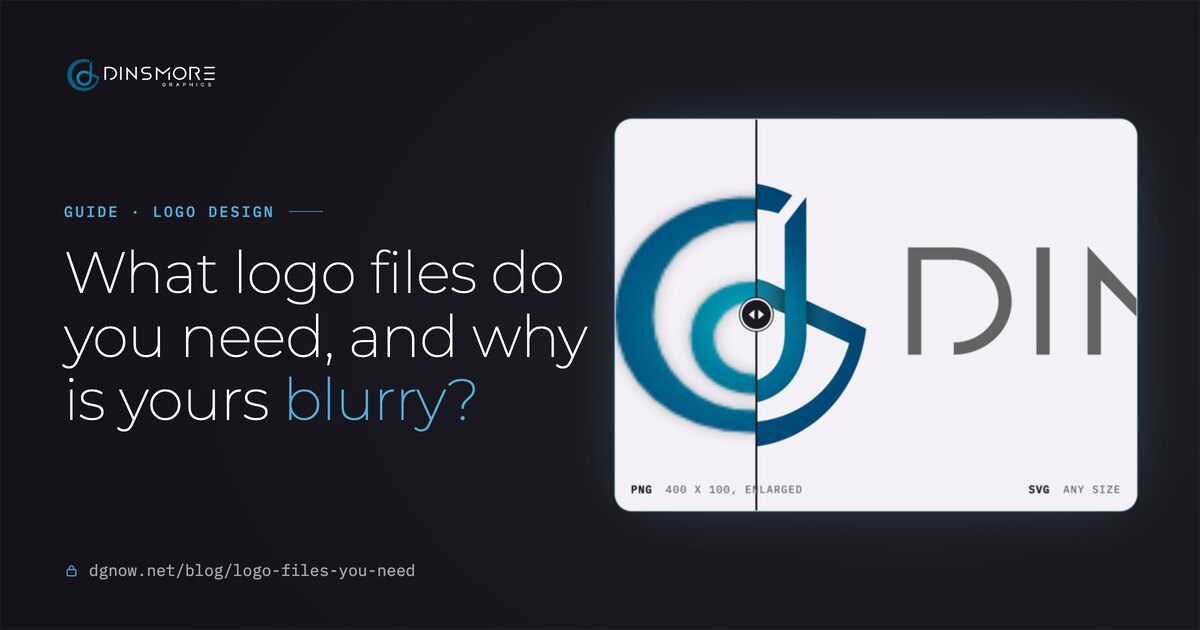
- Blurry means a pixel file shown bigger than it was made. Enlarging it again only makes it softer.
- Send PDF or SVG to printers and sign shops, PNG or WebP to websites and social profiles, JPEG to email.
- You need versions for light and dark backgrounds, one color, and the mark on its own for small spaces.
- If all you have is a small PNG, have it rebuilt as a vector once. Every file after that is easy.
Chapter 01The files
What files should a logo come with?
A vector master in SVG and PDF, PNG and WebP for screens, a JPEG for email, and versions for light, dark and one-color use, plus the mark on its own.
The exact list depends on where your logo goes, but every business ends up needing the same handful. Here is the kit we hand over at the end of every logo project, with what each file is for:
- your-logo-full-color.pdfPrint shops and sign makersPDF
- your-logo-full-color.svgScales to any size and stays sharpSVG
- your-logo-full-color.pngDocuments and slides, on any backgroundPNG
- your-logo-full-color.jpgEmail, forms and anywhere a white background is fineJPEG
- your-logo-full-color.webpFast-loading on your websiteWEBP
- your-logo-one-color.svgStamps, engraving and single-ink printSVG
- your-logo-white.pngDark photos and backgroundsPNG
- your-logo-black.pngForms, receipts and one-ink printPNG
- your-logo-mark.pngSocial profiles and app iconsPNG
- your-logo-mark.webpSmall spots on your websiteWEBP
- brand-guidelines.pdfVersions, colors, fonts and how to use themPDF
If your designer sends a single PNG and calls it done, ask for the rest now, while they still have the original. It takes them minutes; it can cost you a rebuild later.
Chapter 02Why blurry
Why does my logo look blurry?
It is a pixel file, usually a PNG or JPEG, shown bigger than it was made. Vector files like SVG and PDF stay sharp at any size.
A PNG or JPEG is a grid of colored squares with a fixed size. Shown at that size, it looks fine. Stretch it across a website header, a banner or a phone screen that packs two or three pixels into every dot, and the squares show as soft, fuzzy edges. A vector file has no squares to stretch.
Pixel filePNG, 400 x 100
40,000 tiny squares. Make it bigger and each square just gets bigger.
Vector fileSVG
Shapes described with math. The screen or printer redraws them sharp at any size.
- 1Open the file and zoom in
Zoom to 400 or 800 percent in any viewer.
- 2Look at a curve
Smooth at every zoom level means vector. Soft or stair-stepped edges mean pixels.
- 3Check the file name
.svg, .pdf, .ai and .eps can be vector; .png, .jpg and .webp are always pixels.
- 4Watch for a PDF with a photo inside
A PDF can hold a pixel image. If it blurs when you zoom, it isn't a real vector.
Chapter 03Which file where
Which file do I send where?
Vector (PDF or SVG) for anything printed, cut or stitched. PNG, WebP or SVG for screens. JPEG only where a white background is fine.
Where is the logo going?
Send: PDF, full colorA vector PDF prints sharp at any size. Ask the printer if they want CMYK.
Send: PDF or SVGThey cut and print from vector shapes. A PNG can't be cut into vinyl.
Send: One-color SVG or PDFThread and ink go on one color at a time; the shop turns your vector into stitches or screens.
Send: SVG or WebPSVG stays crisp on every screen; WebP loads fast. Use a PNG if your site won't accept SVG.
Send: The mark, PNGProfile spots are small squares. The mark alone reads; the full logo turns to mush.
Send: Square PNG, larger than 48 pxGoogle asks for a square icon and recommends larger than 48 x 48 pixels.
Send: PNG, sized to fitA small PNG at about twice the size it shows, so it stays crisp on phones.
Send: PNG, full colorA see-through background sits cleanly on any page or slide color.
One rule covers most of it: if a person or machine will make something physical from your logo, send vector. If it only lives on a screen, a pixel file made at the right size is fine.
Chapter 04Formats
What do PDF, SVG, EPS, PNG, JPEG and WebP mean?
SVG and PDF are vector and stay sharp. PNG, JPEG and WebP are pixels and have a fixed size. EPS and AI are older vector formats for designers and some print shops.
| Format | Type | See-through background | Best for | Avoid for |
|---|---|---|---|---|
| SVG | Vector | Yes | Websites, cutting, any size | Some platforms won't accept uploads |
| Vector, if made right | Yes | Printers, sign shops, sharing | Posting on social media | |
| EPS / AI | Vector | Yes | Older print workflows, design edits | Everyday use; most people can't open them |
| PNG | Pixels | Yes | Documents, slides, social, websites | Enlarging past its size |
| JPEG | Pixels | No, always a box | Email, forms, photos | Anything on a colored background |
| WebP | Pixels | Yes | Fast websites | Email and older software |
Do you need an EPS? Only if a printer asks for one. A vector PDF or SVG covers almost everything EPS used to, and you can open them without design software.
Chapter 05Versions
Why do I need light, dark and one-color versions?
Because one logo has to work on white paper, dark photos, one-ink stamps and a 16-pixel browser tab. One file can't do all of that.
Full colorLight backgrounds

WhiteDark photos and backgrounds
One colorForms, stamps, one-ink print
The mark on its own, at real size
 16 pxBrowser tab
 32 pxTab, sharp screens
 48 pxSearch results
 180 pxPhone home screen
For your site icon, Google asks for a square image at least 8 x 8 pixels and recommends one larger than 48 x 48, in a common format like PNG or ICO. Make it from the mark, not the whole logo.
Chapter 06Colors
What are RGB, CMYK, HEX and Pantone?
HEX and RGB describe color on screens, CMYK is for printing with ink, and Pantone is an exact ink a printer can match. Your brand colors should be written down in all of them.
- HEX
- #485E88
- RGB
- 72, 94, 136
- CMYK
- 60, 40, 0, 40
- HEX
- #3A3A3A
- RGB
- 58, 58, 58
- CMYK
- 69, 62, 61, 52
- HEX and RGB: for your website, social posts and anything on a screen.
- CMYK: for printed pieces. Colors can shift a little from screen to paper; that is normal.
- Pantone: a numbered ink for shirts, signs and anything where the exact color matters.
Chapter 07No files?
My logo is blurry and I don't have the files. Now what?
Ask the original designer first, then check old emails and past printers. If only a small PNG or JPEG exists, have it rebuilt as a vector once.
- 1Ask the designer
Ask for the vector masters by name: SVG, PDF, and AI or EPS if they have them.
- 2Search your email
Look for .svg, .pdf, .ai or .eps attachments from the original project.
- 3Ask past printers and sign shops
They often keep the file you sent, and some keep a vector copy they made.
- 4Have it rebuilt
A designer redraws the logo as clean vector shapes, matching the original, then makes the full kit from it.
- AI upscalers guess
Upscaling a small PNG invents detail. Edges come back smooth but wrong: letters warp and thin lines wobble.
- A rebuild is exact
Every curve is redrawn by hand to match the original, so the logo is finally sharp everywhere and yours to keep.
- Find out who owns it
If a past designer won’t send files, our guide to who owns your website covers getting your accounts and files back.
We rebuild old logos as clean, sharp files, even from a low-quality image, and can refresh them along the way if they need it.
Chapter 08From us
What do you get from us?
Every logo we make or rebuild comes with the full kit, brand guidelines, and full ownership of every file.
Logo file checklist
Print it, tick off what you have, ask for the rest.- Vector masters
- SVG and PDF
- Screen files
- PNG, WebP and JPEG
- Light and dark
- White and black versions
- One color
- For stamps and one-ink print
- The mark
- For icons and profiles
- Brand guidelines
- Colors, fonts, do's and don'ts
The logo is checked large and small, down to a browser tab, in full color, one color and black and white, on light and dark backgrounds, before the files are made. You can hand any of them to a printer, a sign shop or a web designer without asking anyone for them again.
Free consultation
Logo looking blurry?
Send me the best copy you have. I'll tell you whether it can be cleaned up or should be rebuilt, and what your full kit would include, before any work starts.
Questions
Straight answers.
More of what people ask about logo files and formats.
Updated
Do I need an EPS file for my logo?
Only if a printer or sign shop asks for one. A vector PDF or SVG does the same job for most of them, and you can open those without design software.
What is the best logo format for my website?
SVG, because it stays sharp on every screen. If your website platform won’t accept SVG, use a PNG or WebP at about twice the size it shows.
Why does my logo look blurry on my phone?
Phone screens pack two or three pixels into every dot you see. A PNG made at the exact display size gets stretched to fill them. Use SVG, or a PNG made at two or three times the size.
What size should my logo PNG be?
Twice the largest size it will show. For a header logo shown 200 pixels wide, make the PNG 400 pixels wide. For print, use the vector file instead.
Can I turn my JPG logo into a vector?
Automatic tracing tools try, but the results usually need cleanup: wobbly curves and lost detail. A designer redrawing it gives you an exact, clean vector you can use for years.
Who owns my logo files?
You should. Ask for the vector masters and every version at the end of the project, and keep them somewhere you control. With us, the logo and every file are yours.