

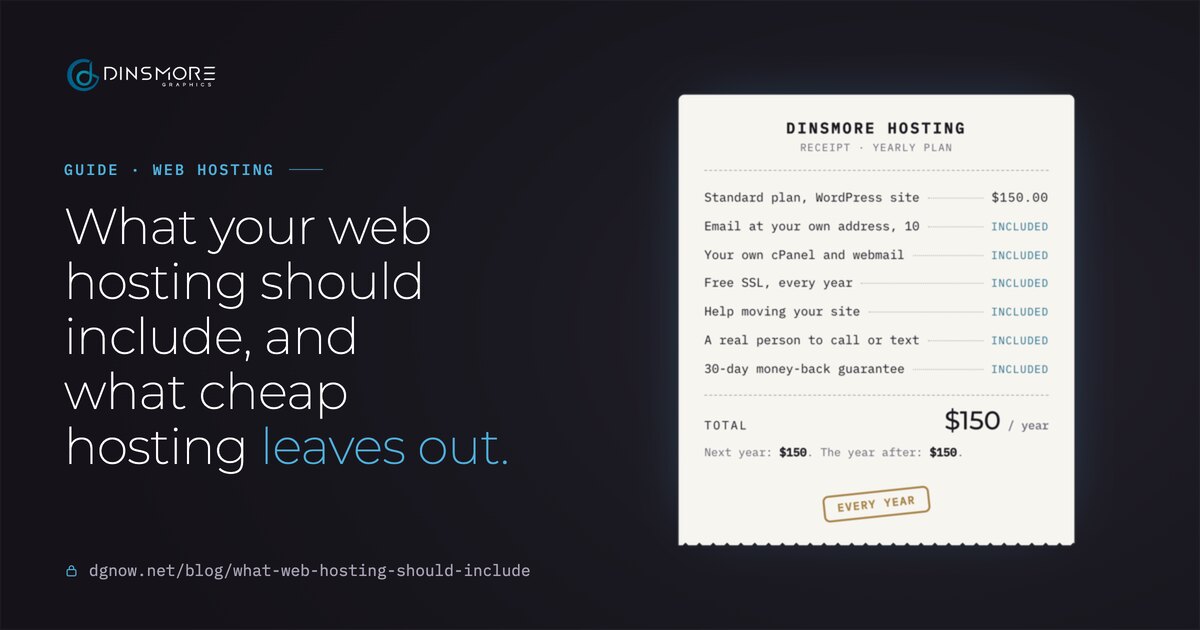
- Standard plan, WordPress site$150.00
- Email at your own address, 10included
- Your own cPanel and webmailincluded
- Free SSL, every yearincluded
- Help moving your siteincluded
- A real person to call or textincluded
- 30-day money-back guaranteeincluded
Next year: $150. The year after: $150.
Key takeaways
- Compare renewal prices, not first-year prices. The renewal is what you pay every year after.
- Email at your own address, free SSL and your own control panel should come with every plan.
- Ask who answers when something breaks: a person who knows your site, or a queue.
- Your domain, logins and files should be yours, so you can leave any time.
- Decide who keeps the site updated: you, a tune-up a few times a year, or a care plan.
Chapter 01What it includes
What should web hosting include?
Email at your own address, your own control panel, free SSL, the same price at renewal, a real person to call, help moving in, copies you can make yourself, and a money-back window.
None of these should be extras. They are the basics a small business site needs to run, and every plan should come with them at one price. Here is the list we hold our own plans to:
- Email at your own address
Addresses like you@yourbusiness.com, with webmail you can open anywhere.
- Your own control panel
One place for your files, databases and email accounts. You add and remove them yourself.
- Free SSL
The padlock and https on every page, included every year.
- The same price every year
No low first-year price that jumps at renewal.
- A real person
Someone you can call, text or email who knows your site.
- Help moving your site
Your old site copied, tested and switched over for you.
- Copies you can make yourself
Download your files and databases any time.
- A money-back window
Thirty days to decide it isn’t right, with your money back.
Chapter 02Cheap hosting
What does cheap hosting leave out?
The price you pay after the first year, and the basics sold as extras: SSL, email, help moving, and a person to talk to.
Many hosts advertise a low first-term price and renew at a higher one. The renewal price is usually on the pricing page in small print or in the billing terms. That is the number to compare, because it is what you pay every year after the first:
What will it really cost?
- Renewal price: what the plan costs after the first term, per year.
- SSL: included every year, or a paid upgrade after the first?
- Email: included at your own address, or a separate monthly fee per mailbox?
- Moving in: free help, a fee, or do it yourself?
- Support: a person who knows your site, or tickets and chat only?
Chapter 03Email
Is email included, and what about Gmail?
It should be. Every plan should give you addresses at your own domain with webmail. If you use Gmail through Google Workspace, keep it; your hosting and Google can share the same domain.
- Addresses on every plan
From 3 on the smallest plan to unlimited on the larger ones, all at your own domain.
- You manage them
Add, remove and reset email accounts yourself in cPanel, or ask me to.
- Google Workspace works too
Keep Gmail, Drive, Calendar and Meet with Google while your site stays on your hosting. Google bills Workspace separately.
Whichever you use, your domain needs the right email records so messages don't land in spam. Our guide to why business emails go to spam walks through them.
Chapter 04cPanel
What is cPanel, and do I need it?
cPanel is the control panel for your hosting account. It is where you add email addresses, manage files and databases, and make your own copies of the site.
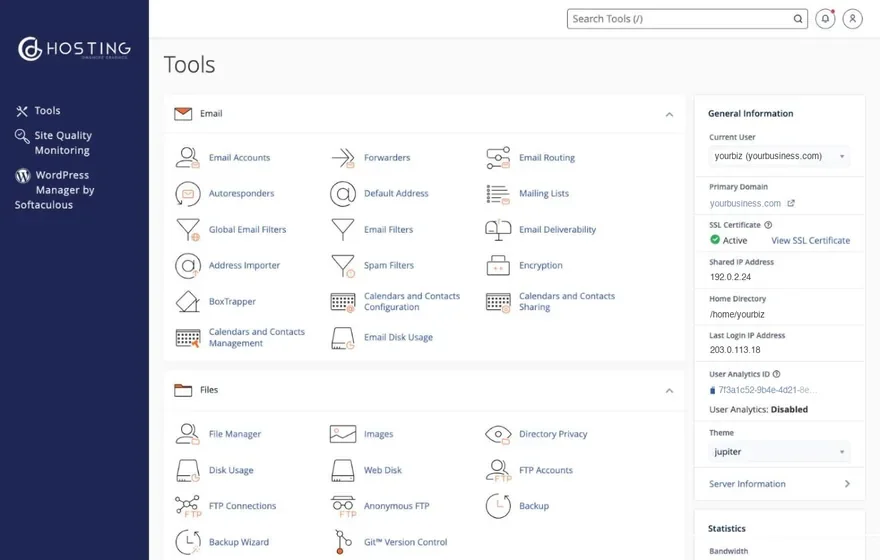
- Email: create addresses, set forwarders and autoresponders, open webmail.
- Files: upload, edit and download your website’s files.
- Copies: download a copy of your files and databases whenever you like.
- Security: see your SSL certificate is active and manage access.
Some hosts give you their own simplified panel instead, or none at all. That can be fine, as long as you can still reach your files and email without asking.
Chapter 05Support
Who do I call when something breaks?
With most big hosts, a ticket queue. With a small host, it can be the person who set up your site. Ask before you buy.
A big hostExample
Thank you for contacting support. Your request has been received and added to our queue. A member of our team will respond within 3 to 5 business days.
Waiting for an agentDinsmore HostingExample
Hi Anthony, our contact form stopped sending emails this morning.
Thanks, checking it now.
Fixed. A mail setting had changed. I just sent a test from your form, so you should see it in your inbox.
Got it. Thank you!
With Dinsmore Hosting, you call, text or email me directly. I answer as fast as I can, and I fix it or tell you exactly what is going on.
Chapter 06Ownership
Who owns my site and domain?
You should: the domain in your name, your own logins from day one, and your files downloadable any time, so you can leave whenever you like.
- DomainIn your name, on your account.Yours
- cPanel loginYours from day one.Yours
- WebmailYour addresses, your passwords.Yours
- FilesBack up and download any time.Yours
- LeavingAny time, and 30 days money-back.Your call
If a past designer or host holds any of these, our guide to who owns your website covers how to get each one back.
Chapter 07Self or full service
Should I manage it myself or hand it off?
Either works. The real difference is who keeps the site updated and secure: you, a tune-up a few times a year, or a care plan.
| Self-service | Website Tune-Up | Full-service care | |
|---|---|---|---|
| Who keeps WordPress, the theme and plugins updated | You | Me, each time you book one | Me, all the time |
| Backups | Your own copies in cPanel | A full backup of the site and database first | A backup before and after every update |
| If the site is hacked | Your cleanup; I can help at my hourly rate | Fixed free if you book one at least every 3 months | Fixed free |
| Price | Included with every plan | $150 each time | From $35 a month |
WordPress runs more websites than any other system, so people are always looking for ways into it. Updates close those gaps. Whoever does them, they need to happen, and a Website Tune-Up at least every three months is the simplest middle ground.
Chapter 08Switching hosts
How do I switch hosts without losing anything?
In the right order: copy and test first, set up email, switch the domain at a planned time, and only then cancel the old host.
- 1Look at your site
Your current hosting and site get a look first. Most moves are simple and free; a complex site gets checked before anything starts.
- 2Copy and test
Your site is copied to the new account and tested before anything changes for your visitors.
- 3Set up email
Your email addresses are set up on the new account. Moving old messages is possible and gets a look first.
- 4Switch your domain
Your domain is pointed to the new account at a planned time, with the old host still running.
- 5Cancel the old host
Only after everything works on the new account. Not a day before.
The old host needs to stay paid and running until the last step. Cancelling early is the most common way sites and email go missing during a move.
Chapter 09Which plan
Which plan do I need?
It depends on the kind of site, how many email addresses you need, and how busy it is. Most WordPress sites use the $150 or $250 plan, depending on how many email accounts they need.
| Plan | Best for | Storage | Email accounts | Yearly | Monthly |
|---|---|---|---|---|---|
| Economy | One-page HTML sites | 250 MB | 3 | $50 | $5 |
| Starter | Small HTML sites | 1 GB | 5 | $100 | $10 |
| Standard | WordPress sites | 2 GB | 10 | $150 | $15 |
| Advanced | Busy sites with lots of email | 7.5 GB | Unlimited | $250 | $25 |
| Elite | High-traffic sites | 12.5 GB | Unlimited | $350 | $35 |
- Yearly or monthly: yearly gives you two months free; monthly plans are paid automatically through PayPal.
- Extra storage: $4 a month or $40 a year per GB, on any plan.
- WordPress: needs Standard or above, plus the $50 yearly Elementor Pro license on sites I build.
Questions to ask any web host
Ask every host the same questions, then compare the answers.- Renewal price
- What you pay after year one
- SSL
- Free, and stays free
- At your own address
- Support
- A person, or a queue
- Your files
- Downloadable any time
- Leaving
- Your domain stays yours
Free consultation
Not sure which plan fits?
Tell me about your site and email, and I'll recommend a plan and tell you what moving would involve. No pressure, no upsell.
Questions
Straight answers.
More of what people ask about web hosting.
Updated
Why did my hosting bill go up?
Many hosts sell the first term at a lower price and renew at a higher one. Check your plan’s renewal price in the billing terms. Our plans are the same price every year.
Is free SSL really free?
With us, every account gets a free SSL certificate, every year. Elsewhere, ask whether it stays free at renewal or becomes a paid upgrade.
Do I need managed WordPress hosting?
What a WordPress site needs is someone keeping it updated. That can be you, a Website Tune-Up at least every three months, or full-service care from $35 a month.
Can I keep my domain where it is?
Yes. Your domain stays in your name, on your own account, and is pointed to your hosting. I can also help you set one up in your name as part of a project.
What happens if my site gets hacked?
On self-service, cleanup is yours and I can help at my hourly rate. Book a Website Tune-Up at least every three months, or have full-service care, and malware or hack damage is fixed free.
Can I pay monthly?
Yes. Monthly plans are paid automatically through PayPal. Paying yearly gives you two months free, and there is a 30-day money-back guarantee on both.